Why Kids Should Learn to Code Even If They Never Become Coders
9 min
Picture a Tuesday afternoon in Edina. Your 11-year-old is hunched over a screen, totally absorbed, building something that moves. Then a quiet thought sneaks in: But do they actually need this? They want to be a vet. Or a designer. Or they have no idea yet.
It's a fair question. Coding usually gets sold as a job pipeline, so if your kid may never be a software engineer, wondering whether it's worth the time and money is just good parenting.
Here's my honest answer. Coding is less about becoming a programmer and more about learning to think, plan, try, fail, and try again. Those habits show up in every career.
I'm Jeremiah, co-founder of Coder's Clubhouse. I've spent a long career in software and security (including Microsoft), and I also used code to launch and later sell several businesses. I'll share that story in the next section.
First, what coding builds beyond a career. Then the founder story, a look inside our Path Program, and how you stay in the loop.

What coding builds that has nothing to do with a job title
Think of coding as a gym for executive function. That is the name for the mental skills that help a person plan, stay focused, hold several things in mind at once, check their own work, and change course when something is not working. A kid uses every one of those muscles in a single coding session.
Here is the loop. Your kid takes a big idea, like a game, and breaks it into small steps. Then they predict what the code will do. They run it. It does something different. They notice what went wrong, change one thing, and test again.
That habit is the whole point. The first version is never the final version, and in coding that is completely normal. Debugging just means finding and fixing a mistake in code, and kids learn to treat a mistake as information instead of a verdict on how smart they are. Plenty of adults never learn that.
This idea is not ours. In 2006, computer scientist Jeannette Wing wrote an article called Computational Thinking in Communications of the ACM. She argued it is a fundamental skill for everyone, not just computer scientists, and put it this way:
"To reading, writing, and arithmetic, we should add computational thinking to every child's analytical ability."
Now the screen time question. You do not need a stopwatch, just one test: is my kid making something, or being fed something? Scrolling and passive watching are on the fed side. Building, debugging, and finishing a project are on the making side, and with code there is a real result your kid can prove works.
What about the worry that AI makes learning to code pointless? It is a fair question, and we take it seriously. We are excited about AI, and we think it works best as a teammate. But a teammate still needs direction. Kids who understand code can steer AI, read what it produces, test it, and fix it when it is wrong. That is a stronger position than simply accepting whatever it says.
There is a Minnesota piece too. Our state ranks last in the nation for K-12 computer science access, and only about 28% of Minnesota high schools offer CS, according to Code.org's state data. That is no one's fault. It just means many Edina-area kids will not get this at school unless their families find it elsewhere, which is part of why we opened our clubhouse.
And if you have never written a line of code, relax. You do not need to understand code to raise a kid who does.
How Jeremiah used code to start, grow, and sell businesses
Here is the part that surprises people. The most useful thing code ever gave me was not a job.
I spent years in software and security, including time at Microsoft. But the bigger story is that I used what I knew about code to launch, and later sell, several businesses. I'm not sharing that to brag. Looking back, the skills that mattered were the same ones your kid practices in every session.
Planning the build. A business, like a program, is a set of steps that have to happen in the right order. Knowing what comes first, what can wait, and how to stay with a long project after the fun wears off is executive function at work.
Shipping small, then improving. My first version of anything was never good, and that was fine. You put something small in front of real people, learn what is wrong, and make it better. Then you do it again. A launch is never the finish line. It is day one of continuous improvement.
Debugging. Things break. The people who do well stay calm and hunt for the real cause instead of panicking or guessing. Kids practice exactly this whenever their code does something unexpected and they have to work out why.
The skills were also bigger than the code itself. I understood how a product actually worked. I could build a first version without waiting for permission or a big budget. And I could talk with technical people without feeling lost or intimidated.
Your kid might become a vet, a designer, a teacher, a business owner, or something that does not exist yet. Building and fixing things transfers to all of it.
Today those same skills include working with AI, and I'm genuinely excited about that. A kid who can direct AI, question its answers, and check its work has a real edge over one who simply accepts whatever it says.

Inside the Path Program: real code, real projects, real accountability
The Path Program is a year-round coding and STEM membership at our Edina clubhouse, 7101 France Ave S., Suite 109. It is for ages 9 to 18. There are 8 levels, and each one runs about 16 to 24 weeks. Kids meet weekly in small-group labs with 11 kids max, and you can start anytime.
Kids move at their own pace with an instructor in the room. Self-paced never means on their own. We are local and family-owned, not a franchise, and we built the Path partly because Minnesota ranks last in the nation for K-12 computer science access.
Real typed code, not drag-and-drop forever. Scratch is only the on-ramp. Every tool on the Path has a home base you can check out yourself: Scratch from the MIT Media Lab, micro:bit from the Micro:bit Educational Foundation, MDN Web Docs for HTML, CSS and JavaScript, python.org for Python, the Flask documentation from Pallets Projects, and Microsoft Learn for C#. Working developers read those same pages.
Here is what kids build, level by level:
Foundation (10+, about 20 weeks): Scratch, the MakeCode micro:bit simulator, and HTML with EduBlocks. Kids build Scratch games and animations, micro:bit simulations, and a first webpage.
Pioneer (10+, about 16 weeks): HTML, CSS, JavaScript, and a real Micro:bit V2 in MakeCode JavaScript. Kids make styled webpages with lists, tables and forms, plus interactive Micro:bit games using LEDs, buttons, sensors and sound.
Explorer (11+, about 16 weeks): Python, a readable, general-purpose language that working developers use every day. Kids build number guessing games, text adventures and interactive challenges.
Ranger (11+, about 20 weeks): Python and Pygame. Kids build a full space arcade game with a ship, meteors, power-ups and a scoreboard.
Warrior (12+, about 20 weeks): Python, Flask, MySQL, and HTML/CSS. Kids build Pizza Palace, a full-stack restaurant menu app with login. It runs on a database, which is an organized place where an app stores things like menu items and user accounts.
Engineer (12+, about 24 weeks): C# and WinForms. Kids learn how a compiled language (translated into a finished program before it runs) differs from an interpreted one (read line by line as it runs), plus object-oriented basics. They build three Windows desktop apps and a polished final game.
Master (13+, about 24 weeks): Python, C#, and HTML/CSS plus AI tools. Kids take over existing codebases, then debug, extend and document them the way engineers do on the job.
Grandmaster (14+, about 24 weeks): Python, microcontrollers (tiny computers on a single chip), breadboard electronics, 3D printing, speech-to-text, GPT models and text-to-speech. Kids build Voices of History, a talking AI bot that plays figures like Einstein, Curie, Newton or Cleopatra, inside a custom 3D printed housing.
Later levels end with kids presenting their finished projects to peers and family. Standing up and explaining what you built is a skill that follows a kid everywhere.
AI is taught the way working engineers use it: steer it, read it, test it, fix it. In Master level, kids use AI to explain unfamiliar code and help find bugs. Then they test and check every suggestion before it goes anywhere near their project. The AI is a teammate, and the kid is the one in charge.
How a session works. Kids log into the Learning Portal, our own custom-built platform. Each session starts with short animated lesson videos, then hands-on coding in the Playground tab. After every lesson there is a comprehension check, and kids have to pass it to move on. Each session ends with a final activity that pulls together that day's lesson and earlier ones.
To pass, a kid has to prove their code works and get an instructor's approval. That is the point. Kids cannot click through content. They learn it.
The portal also includes a dyslexia-friendly font option and a text-to-speech reader that reads lessons aloud. That helps kids who are still building reading skills, or who simply learn better by listening, keep up with the coding.
XP keeps it fun. Kids earn XP for passing levels, finishing challenges, pushing through tough problems, staying locked in and focused, helping a neighbor, and random surprise drops. XP cashes out for prizes like toys, games, gift cards, snacks, 3D prints, fidget toys and more. An XP Leaderboard TV in the clubhouse shows everyone's XP live.
XP rewards effort and character, not just speed. At Coder's Clubhouse, helping a neighbor counts as much as finishing first.
What it means for your family (and how to see it for yourself)
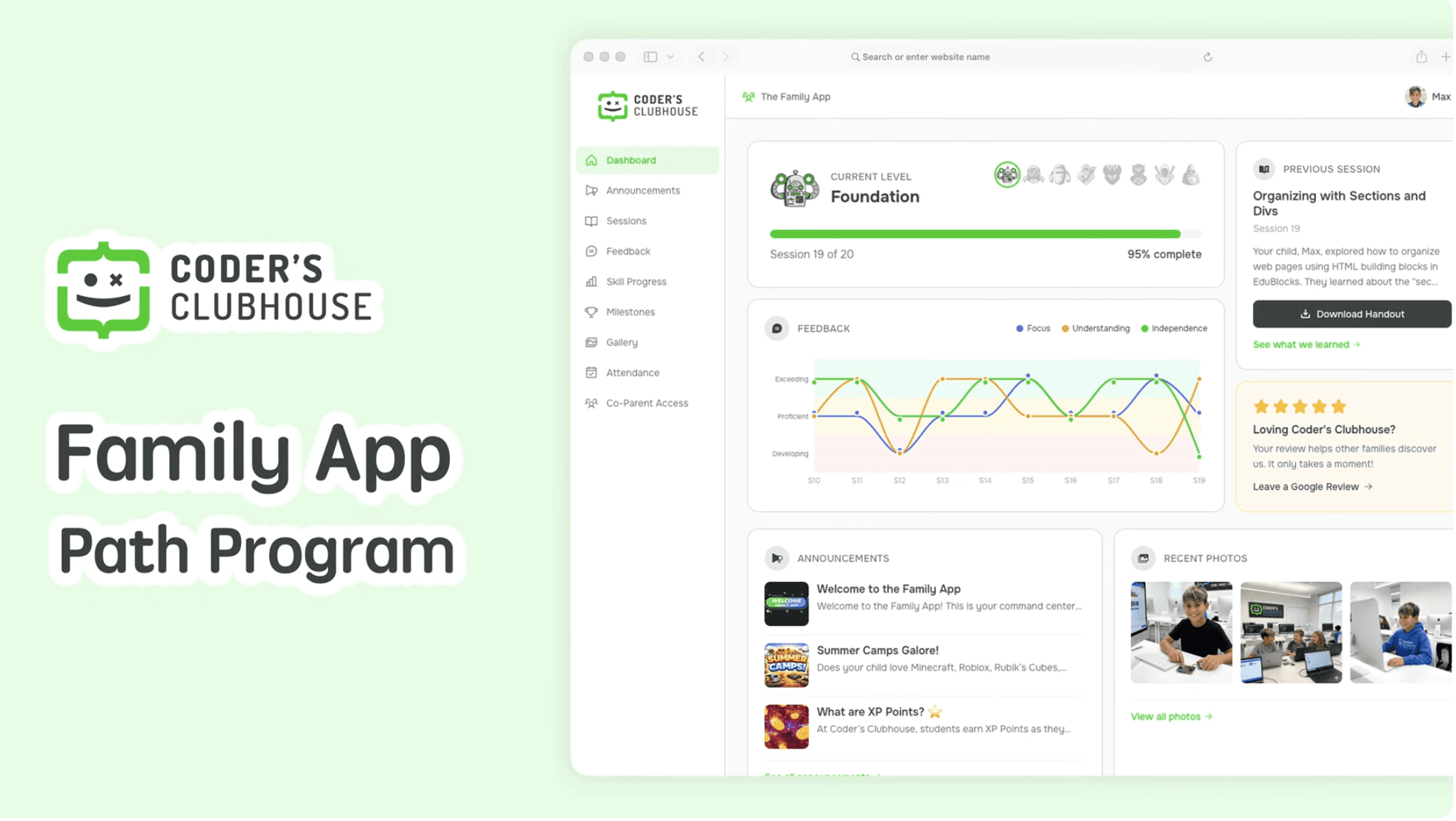
Here is the part many parents care about most: you get to see it. Every Path family gets the Family App, and you do not need to know a single line of code to use it.
After every session, you see your kid's progress and written instructor feedback. You also get a video preview of what they built as soon as they finish. A radar graph shows growth across several skill areas over time. Session downloads and conversation prompts let you talk about it at home and keep the learning going.
A dinner-table version might sound like this: "What broke today, and how did you figure out why?" Or: "If you could add one thing to your game, what would it be?" Kids love explaining their own work, and you learn a lot just by listening.
Whether your kid becomes an engineer, a founder like Jeremiah or Katie, a vet, or something that does not exist yet, our hope is that they leave with focus, patience, a habit of improving their work, and real confidence with technology and AI. That is what we hope for, and it is what we watch for in every session.
The practical details: the Path Program is $270/month, a monthly subscription you can start anytime, with small groups of 11 kids max at our Edina clubhouse.
The easiest next step is a free trial class at book.codersclubhouse.com. If you would rather look around first, you can take a tour, and when your family feels ready, enrolling is simple. Or just ask your kid tonight what they would build if they could build anything. Their answer might surprise you.
Sources: Communications of the ACM, "Computational Thinking" by Jeannette Wing (2006); Code.org Advocacy Coalition, State of Computer Science Education; Scratch, MIT Media Lab; Micro:bit Educational Foundation; MDN Web Docs; python.org; Flask documentation, Pallets Projects; Microsoft Learn, C# documentation.
Share This: